Blog
Go backSPF, DKIM and DMARC Explained Without the Migraine
Zero-Bullshit Guides · October 1st, 2026
Email was built on trust. Specifically, on the assumption that nobody would lie about who they are.
That assumption lasted about ten minutes. The protocol that moves your mail, SMTP, will happily let any server claim to be sending from any address. There's no password, no check, nothing. Writing an email that appears to come from your bank is about as hard as writing a letter and putting their address on the back of the envelope.
SPF, DKIM and DMARC are the patches bolted on afterward to fix that. Three acronyms, three DNS records, and one shared purpose: proving that mail claiming to come from your domain actually does.
Here's what each one does, how they fit together and what changed in 2026.
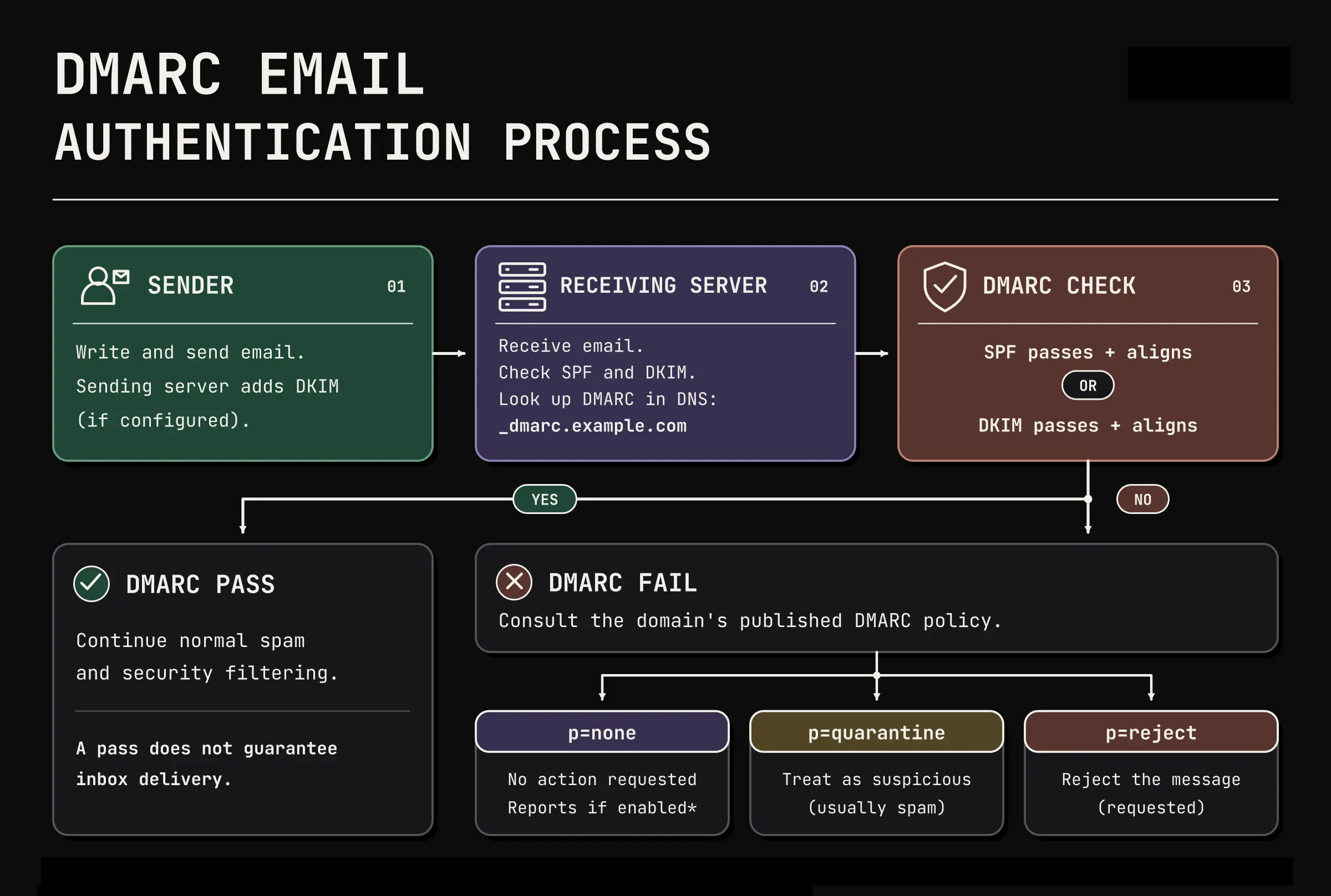 Passing a check isn't enough. It has to belong to the domain your reader actually sees.
TL;DR
- SPF lists which servers may send mail for your domain. It checks the envelope sender, not the address your recipient sees.
- DKIM signs each message, proving which domain signed it and that the signed parts weren't altered.
- DMARC requires one of those to match the From address your recipient sees, tells receivers what to do when neither does, and sends you reports.
- You need both SPF and DKIM. Forwarding often breaks SPF, while a DKIM signature can survive it. Mailing lists often break DKIM, and SPF usually can't rescue it, because the list passes for its own domain.
- 2026 update: DMARC is now a real standard (RFC 9989). The
pcttag is gone,t=ymeans one step softer rather than off, and three old tags should be deleted. - Roll out slowly:
p=nonefirst, read the reports, thenquarantine. Whetherrejectis right for you depends on how your domain is used.
Why Any of This Exists
When you send a message, two different "from" addresses are involved, and that distinction is the key to everything below.
The envelope sender is what the sending server tells the receiving server during the SMTP conversation. Think of it as the return address on the outside of the envelope. Nobody reads it except the postal system.
The From header is what your mail app displays. That's the one humans see, and the one scammers care about.
They don't have to match. That gap is where spoofing lives, and it's why SPF alone was never enough.
SPF: Who's Allowed to Send
SPF (Sender Policy Framework) is a list of servers permitted to send mail for your domain, published as a TXT record in DNS. It looks like this:
v=spf1 include:_spf.example-provider.com ip4:203.0.113.5 ~all
Read it left to right: this is an SPF record, mail may come from the servers that provider lists, also from this one IP address, and anything else is suspicious.
That last bit matters:
~all(softfail) means "probably not authorized." Receivers are told not to reject on that result alone.-all(fail) means "not authorized." Even then, it's a result, not an instruction. What happens next is the receiver's decision.+allmeans "anyone may send as us." If you ever see this, something has gone badly wrong.
Worth being clear: SPF produces a verdict, not a delivery outcome. No setting guarantees the inbox, and none forces a rejection.
Three things that trip people up:
- Only one SPF record per domain. Two records is a configuration error, and receivers may fail the check entirely. Merge everything into one.
- Ten DNS lookups, maximum. Every
include:costs lookups, and each service you add brings its own. Go over the limit and the check fails outright. Three or four providers is enough to get you there. - Forwarding usually breaks SPF. If someone forwards your message, the forwarding server becomes the sender, and it isn't on your list. This isn't a bug you can fix. It's why DKIM exists.
DKIM: Proof It's Really You
DKIM (DomainKeys Identified Mail) takes a different approach. Instead of listing servers, your sending server signs each message with a private key. The matching public key sits in your DNS, and the receiver uses it to verify the signature.
What a valid signature proves is narrower than people assume: that the domain in the signature signed this message, and that the signed parts arrived unaltered. That signing domain doesn't have to be the domain in the From address, which is exactly the gap DMARC closes. Canonicalization rules also allow some harmless reformatting, such as whitespace changes, without breaking the signature.
The result is a header on every message that looks roughly like this:
DKIM-Signature: v=1; a=rsa-sha256; d=example.com; s=selector1; ...
The d= is your domain, and s= is the selector, a label that tells the receiver which key to look up. Selectors let you run several keys at once, which is what makes key rotation possible without downtime.
Why DKIM is the more resilient of the two: the signature travels with the message rather than the connection. It can survive several forwards, provided the signed content stays intact under its canonicalization rules.
What breaks it: changes that alter the signed data beyond what the canonicalization rules tolerate. Some whitespace changes are tolerated, depending on the canonicalization rules used. Mailing lists that add a footer or rewrite the subject line are the classic breakage, since both touch signed content. Some lists add their own signature afterward, but yours is already broken by then.
Practical notes: use 2048-bit keys, since 1024 is considered weak now. Rotate keys periodically with a new selector. And check that every service sending on your behalf has DKIM set up, not just your main mail server.
DMARC: The Part That Ties It Together
Here's the gap SPF and DKIM leave open. Both can pass for a domain that has nothing to do with the From address your recipient sees. A scammer can pass SPF and DKIM for their own domain while putting your bank's domain in the visible From address.
DMARC closes that gap with one idea: alignment.
Alignment means the domain that passed SPF or DKIM has to match the domain in the visible From address. A message passes DMARC if either check passes and aligns. One is enough, which is why having both matters: plain forwarding usually breaks SPF while a DKIM signature survives it. Mailing lists are the harder case. A list that edits the message breaks your DKIM signature, and although SPF may well pass for the list's own domain, that domain isn't yours, so it doesn't align and DMARC can still fail.
Alignment comes in two flavors. Relaxed, the default, accepts any subdomain of the same organizational domain, so mail.example.com aligns with example.com. Strict (adkim=s, aspf=s) demands an exact match. If your setup looks broken, check which mode you're in before you start changing records.
A DMARC record is a TXT record at _dmarc.yourdomain.com:
v=DMARC1; p=none; np=reject; rua=mailto:dmarc@example.com
The parts worth knowing:
p=is what receivers should do with mail that fails:none(nothing, just report),quarantine(spam folder) orreject(refuse delivery).rua=is where daily aggregate reports go. These XML files tell you who's sending as your domain and whether it passes. DMARC without reading reports is a smoke detector with the battery removed.sp=sets a different policy for subdomains.np=sets a policy for subdomains that don't exist at all.
What Changed in 2026
For eleven years, every DMARC record anyone wrote was based on RFC 7489, an informational document from 2015. Not a standard. A description of what the big mailbox providers had agreed among themselves, which everyone then implemented slightly differently.
In May 2026 that changed. DMARC became a proper IETF Standards Track protocol, split across three documents: RFC 9989 for the core protocol, RFC 9990 for aggregate reports and RFC 9991 for failure reports. Together they replace RFC 7489.
Your existing records still work. But four things changed:
pctis removed. This was the "apply my policy to only 10% of failing mail" dial, and receivers implemented it so inconsistently that nobody could tell what it was doing. A binaryttag replaces it.t=yis not an off switch. It asks receivers to apply the next less strict policy:rejectbecomes quarantine,quarantinebecomes none. Receivers that haven't adopted RFC 9989 ignore the tag and apply your policy in full, so don't treat it as a safe universal test mode.- Watch out if you sit at a fractional
pct. A receiver following the new spec ignores the tag and applies your full policy. npmoves into the standard. It sets the policy for mail that fails DMARC while claiming a subdomain that DNS reports as nonexistent, meaning the lookup returns NXDOMAIN rather than merely lacking one record type. The tag isn't new; it came from the experimental RFC 9091 in 2021, but it's part of the core spec now. Check your real sending subdomains resolve before you publishnp=reject.rfandriare removed.rfnamed the format for failure reports, which use an ARF-derived format.rirequested an interval between aggregate reports, which are XML. Receivers are encouraged to report daily, but nothing obliges them to send reports at all, which is what made a requested interval meaningless. Delete both tags.
One more change happens behind the scenes: receivers used to consult the Public Suffix List, a big crowd-maintained file, to work out where your organizational domain ended and subdomains began. That's replaced by a DNS tree walk, which queries your DNS directly. As a sender, you just need your DMARC record published at your organizational domain.
Adoption won't be instant. Gmail, Yahoo and Microsoft will each move on their own schedule, so for a while a message might be judged by either the old rules or the new ones. Records that work under both are the safe play, and that's what the examples here are.
Rolling It Out Without Breaking Your Mail
The order matters. Do it backwards and you'll silently delete your own invoices.
- Publish SPF and DKIM for every service that sends on your behalf. Your mail provider, your newsletter tool, your CRM, your billing system, that cron job from 2019. All of them.
- Publish DMARC at
p=nonewith aruaaddress. Nothing changes for your mail. Reports start arriving. - Check your subdomains, then consider
np=reject. Confirm every subdomain you actually send from resolves in DNS, and you can close a whole class of spoofing cheaply. - Read the reports for a few weeks. You'll find senders you forgot about. Fix each one so it aligns.
- Move to
p=quarantine, watch for problems, and then decide whetherrejectsuits your domain.
That last word is deliberate. RFC 9989 advises against p=reject for domains whose users post to mailing lists, because redistribution breaks authentication and legitimate mail dies. It also tells receivers to treat a reject failure as quarantine unless their own analysis supports rejecting, and says any domain publishing reject should have working aligned DKIM rather than leaning on SPF. A parked domain that sends nothing is the easy case for reject. A transactional domain can get there too, once you've confirmed every sending path authenticates and watched for forwarding problems in the reports. A domain full of humans who join mailing lists may be better off stopping at quarantine.
The slow part is step 4, and skipping it is how companies discover their payroll notifications were going to nobody.
How to Check Your Own Setup
Three commands tell you most of what you need:
dig +short TXT example.com # your SPF record
dig +short TXT selector1._domainkey.example.com # a DKIM key
dig +short TXT _dmarc.example.com # your DMARC policy
Then check from the other side. Send a message to an account elsewhere and look at the raw headers for the Authentication-Results line. It names each check and whether it passed. That's the receiving server's verdict, which is the only opinion that counts.
What This Does Not Protect You From
Authentication proves a message came from a domain. It says nothing about whether the domain belongs to someone honest.
- Lookalike domains.
yourbank-secure.comcan have perfect SPF, DKIM and DMARC. It's still a scam. - Display-name spoofing. Most mail apps show "Your Bank" and hide the actual address. The name field is free text and always has been.
- Compromised accounts. If someone steals real credentials, their mail authenticates perfectly, because it genuinely is you.
- Content. A properly signed message can still be a phishing attempt.
Authentication answers "did this really come from that domain?" It never answers "should I trust that domain?"
Why This Became Mandatory
Through 2024, Google and Yahoo started requiring authentication from bulk senders: SPF and DKIM, a DMARC record, one-click unsubscribe on marketing and subscribed mail, and complaint rates kept low. Microsoft followed in 2025 for high-volume senders to Outlook.com.
That turned a best practice into an entry requirement. Fail it and your mail may be rejected, rate-limited or dropped into spam, depending on the provider and the failure. A rejection at least bounces back to you. The quieter outcomes, throttling and the spam folder, are the ones you discover weeks later from a customer.
For small senders the rules are looser, but the direction is clear. Unauthenticated mail is becoming the exception, and exceptions get treated with suspicion.
Where [@fuck.it] Lands
If you're sending from an [@fuck.it] address, all of this is already handled for you. Our domain is authenticated and monitored, the reports are read, and keeping it that way is a permanent part of the job rather than a thing we set up once.
If you run your own domain somewhere else, the records above are yours to publish. Start at p=none, check which subdomains resolve before adding np=reject, read the reports, and let them tell you how far toward enforcement your domain can go. It's an afternoon of work and a few weeks of patience.
The alternative is finding out from a customer that someone has been sending invoices in your name.
Sources & further reading: RFC 7208: SPF · RFC 6376: DKIM · RFC 9989: DMARC · RFC 9990: DMARC Aggregate Reporting · Google: Email sender guidelines
Related reads: IMAP vs POP3: Which One Should You Actually Use? · Secure Email: The Buzzwords, the Bullshit, the Real Deal